XML Modding
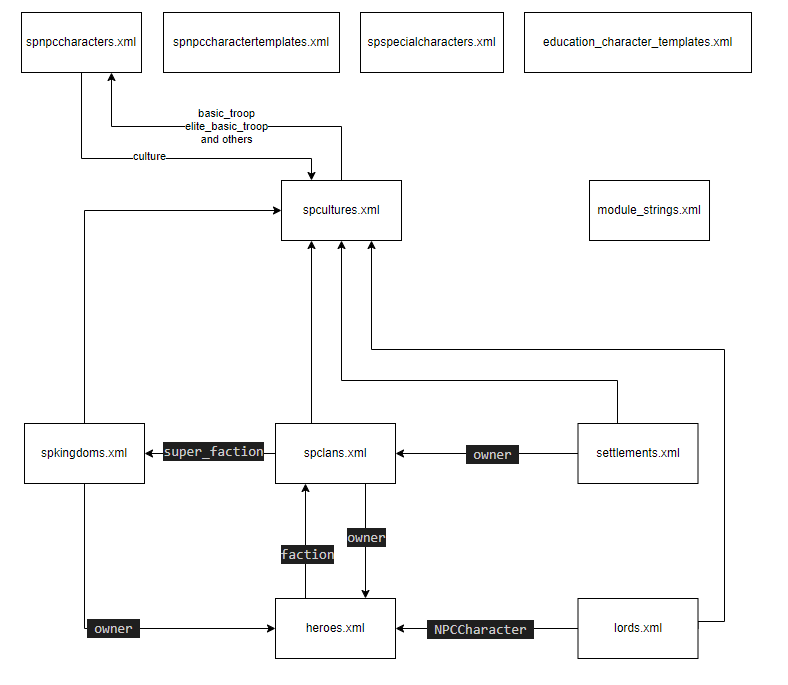
- spcultures.xml - Cultures
- heroes.xml / lords.xml - Heroes
- settlements.xml - Settlements
- spclans.xml - Clans
- spkingdoms.xml - Kingdoms
- npc/characters/templates - NPC Character
- items - Items
Notes
- If you change any native xml stuff you need to remove it with an xslt as well
Formatting
Make ugly XMLs easier to work with!
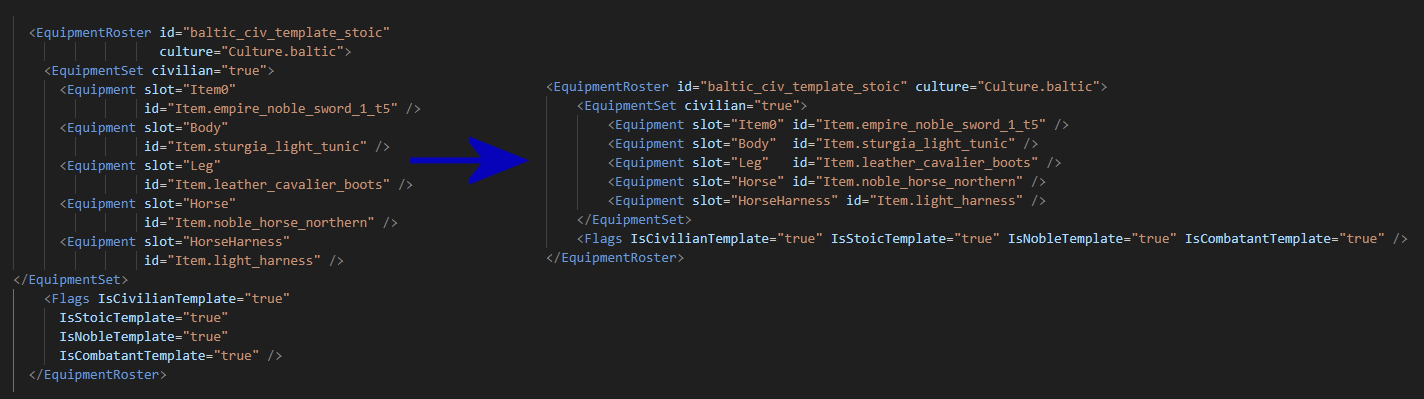
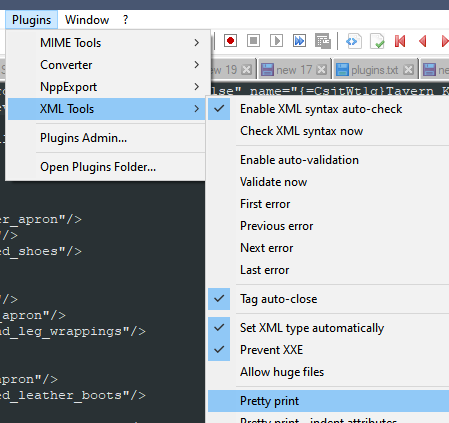
Notepad++ with XML Tools plugin
Online tools:
Comments
Sometimes comments in the XML files lead to a crash.
For example Culture XML file is very sensitive to the comments. Commenting out one name or one of basic_mercenary_troops will crash the game.
Analysis by Sly:
while (enumerator2.MoveNext())
{
    object obj15 = enumerator2.Current;
    XmlNode xmlNode14 = (XmlNode)obj15;
    mblist13.Add(objectManager.ReadObjectReferenceFromXml<CharacterObject>("name", xmlNode14));
}
continue;
ye, the merc troops aren't protected against against comments
if (xmlNode12.NodeType != XmlNodeType.Comment)
{
string name = xmlNode12.Name;
ItemComponent itemComponent;
if (!(name == "Armor"))
{
    if (!(name == "Weapon"))
    {
        if (!(name == "Horse"))
item components on objects are comment protected seems to be pretty variable what has protection for anything below the top-level nodes strings.xml is protected at all levels from comments it's weird because they have most of the code needed to have protection everywhere, it's just not applied When any xml is being read, it protects the first 2 levels of nodes by default, but anything after is quite variable and generally object-type specific.
and everything after that is hit or miss; you generally need to have an existing example of a comment to be sure it won't cause an issue the first 2 levels should be true across all xmls deserialized by the object manager extension which contains the start of the xml readXSLT
Use XSLT files to remove or modify the elements of XML files that are loaded from other modules. You don’t have to use the XSLT system for adding new elements to the XML files.
You simply create an XSLT file with the same name as the XML file and place it to the same path with your XML file. This added XSLT file is going to make the changes to the XML files of the same type located in modules that were loaded before your module.
In order XSLT to be applied, there should be a XML file with the same name in the same folder.
XML could be empty.
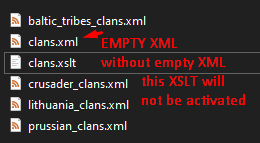
The system applies your module’s XSLT files just before applying your module’s own XML files. So the XSLT files are not going to affect the same module’s own XML files.
Delete an entry
Change an attribute
<xsl:template match="Faction[@id='clan_sturgia_2']/@tier">
    <xsl:attribute name="tier">5</xsl:attribute>
</xsl:template>
Add new attribute
<xsl:template match="NPCCharacter[@id='aserai_recruit']">
    <xsl:copy>
        <!-- Copy existing attributes -->
        <xsl:apply-templates select="@*"/>
        <!-- Add the new attribute -->
        <xsl:attribute name="is_hidden_encyclopedia">true</xsl:attribute>
        <!-- Process child nodes -->
        <xsl:apply-templates select="node()"/>
    </xsl:copy>
</xsl:template>
Change a section
<xsl:template match="Kingdom[@id='aserai']/relationships">
    <relationships>
        <relationship kingdom="Kingdom.empire_s" value="-1" isAtWar="true" />
    </relationships>
</xsl:template>
Match several elements at once
<xsl:template match="NPCCharacter[
    @id='caravan_master_aserai' or
    @id='caravan_master_battania' or
    @id='khuzait_militia_veteran_spearman']">
    <xsl:copy>
        <xsl:apply-templates select="@*"/>
        <xsl:attribute name="is_hidden_encyclopedia">true</xsl:attribute>
        <xsl:apply-templates select="node()"/>
    </xsl:copy>
</xsl:template>
Example - Change Lord
Will change Caladog
In SubModule.xml:
<XmlNode>
    <XmlName id="NPCCharacters" path="npc_lords"/>
    <IncludedGameTypes>
        <GameType value = "Campaign"/>
        <GameType value = "CampaignStoryMode"/>
        <GameType value = "CustomGame"/>
        <GameType value = "EditorGame"/>
    </IncludedGameTypes>
</XmlNode>
In your Module data create folder npc_lords
Add lords.xml file there:
Add lords.xslt file
<xsl:stylesheet version="1.0" xmlns:xsl="http://www.w3.org/1999/XSL/Transform">
<xsl:output omit-xml-declaration="yes"/>
    <xsl:template match="@*|node()">
        <xsl:copy>
            <xsl:apply-templates select="@*|node()"/>
        </xsl:copy>
    </xsl:template>

    <xsl:template match="NPCCharacter[@id='lord_5_1']">
        <NPCCharacter id="lord_5_1" name="Alibaba" voice="earnest" age="42" is_female="false" is_hero="true" culture="Culture.aserai" occupation="Lord" default_group="Cavalry">
            <face>
                <!-- custom face -->
                <BodyProperties version="4" age="42.27" weight="0.3787" build="0.9598" key="000DA40980001948AF7B0F8C4F65FFE877F685FF6F72FA04C52A54008AF25F986E7006350B469080E60034000040F124000000000000003B0000000005743086"/>
            </face>
            <skills>
                <skill id="Engineering" value="170"/>
                <skill id="Medicine" value="71"/>
                <skill id="Leadership" value="250"/>
                <skill id="Steward" value="53"/>
                <skill id="Trade" value="199"/>
                <skill id="Charm" value="150"/>
                <skill id="Roguery" value="66"/>
                <skill id="Scouting" value="121"/>
                <skill id="Tactics" value="200"/>
                <skill id="Crafting" value="131"/>
                <skill id="Athletics" value="240"/>
                <skill id="Riding" value="200"/>
                <skill id="Throwing" value="4"/>
                <skill id="Crossbow" value="81"/>
                <skill id="Bow" value="169"/>
                <skill id="Polearm" value="200"/>
                <skill id="TwoHanded" value="200"/>
                <skill id="OneHanded" value="200"/>
            </skills>
            <Traits>
                <Trait id="Mercy" value="-1"/>
                <Trait id="Valor" value="0"/>
                <Trait id="Honor" value="-1"/>
                <Trait id="Generosity" value="1"/>
                <Trait id="Calculating" value="2"/>
                <Trait id="Egalitarian" value="-1"/>
                <Trait id="Oligarchic" value="0"/>
                <Trait id="Authoritarian" value="0"/>
            </Traits>
            <Equipments>
                <EquipmentSet id="bat_king_template_bat_m"/>
                <EquipmentSet id="bat_king_template_civ_m" civilian="true"/>
            </Equipments>
        </NPCCharacter>
    </xsl:template>

</xsl:stylesheet>
Example - Delete/Remove native items
Will delete some items from the \Modules\SandBoxCore\ModuleData\items\head_armors.xml
In YOUR_MOD\SubModule.xml add:
<XmlNode>
    <XmlName id="Items" path="native_items"/>
    <IncludedGameTypes>
        <GameType value = "Campaign"/>
        <GameType value = "CampaignStoryMode"/>
        <GameType value = "CustomGame"/>
        <GameType value = "EditorGame"/>
    </IncludedGameTypes>
</XmlNode>
In your Module data create folder native_items
Add head_armors.xml file there:
In file head_armors.xslt add:
<xsl:stylesheet version="1.0" xmlns:xsl="http://www.w3.org/1999/XSL/Transform">
    <xsl:output method="xml" omit-xml-declaration="no" indent="yes" />

    <xsl:template match="@*|node()">
        <xsl:copy>
            <xsl:apply-templates select="@*|node()"/>
        </xsl:copy>
    </xsl:template>

    <!-- remove native items -->
    <xsl:template match="Item[@id='headscarf_d']" />
    <xsl:template match="Item[@id='open_head_scarf']" />
    <!--
    <xsl:template match="Item[@id='ITEM_ID from \Modules\SandBoxCore\ModuleData\items\head_armors.xml']" />
    -->

</xsl:stylesheet>
In the game those items should not be present now.
Some items are hardcoded
If you will remove them, it is possible to get a crash in the tournament. To solve that you need to (harmony) patch this method:
    private void CachePossibleEliteRewardItems()
    {
        if (this._possibleEliteRewardItemObjectsCache == null)
        {
            this._possibleEliteRewardItemObjectsCache = new MBList<ItemObject>();
        }
        foreach (string text in new string[]
        {
            "winds_fury_sword_t3", "bone_crusher_mace_t3", "tyrhung_sword_t3", "pernach_mace_t3", "early_retirement_2hsword_t3", "black_heart_2haxe_t3", "knights_fall_mace_t3", "the_scalpel_sword_t3", "judgement_mace_t3", "dawnbreaker_sword_t3",
            "ambassador_sword_t3", "heavy_nasalhelm_over_imperial_mail", "sturgian_helmet_closed", "full_helm_over_laced_coif", "desert_mail_coif", "heavy_nasalhelm_over_imperial_mail", "plumed_nomad_helmet", "ridged_northernhelm", "noble_horse_southern", "noble_horse_imperial",
            "noble_horse_western", "noble_horse_eastern", "noble_horse_battania", "noble_horse_northern", "special_camel", "western_crowned_helmet", "northern_warlord_helmet", "battania_warlord_pauldrons", "aserai_armor_02_b", "white_coat_over_mail",
            "spiked_helmet_with_facemask"
        })
        {
            this._possibleEliteRewardItemObjectsCache.Add(Game.Current.ObjectManager.GetObject<ItemObject>(text));
        }
        this._possibleEliteRewardItemObjectsCache.Sort((ItemObject x, ItemObject y) => x.Value.CompareTo(y.Value));
    }
Custom spnpccharacters.xml case
If your spnpccharacters.xml includes edited troops or characters already in ...\SandBoxCore\ModuleData\spnpccharacters.xml it will overwrite all of the SandBoxCore entries <...> making a mess
More info here.